




See Where Your Java App Spends Time
Right in Your IDE

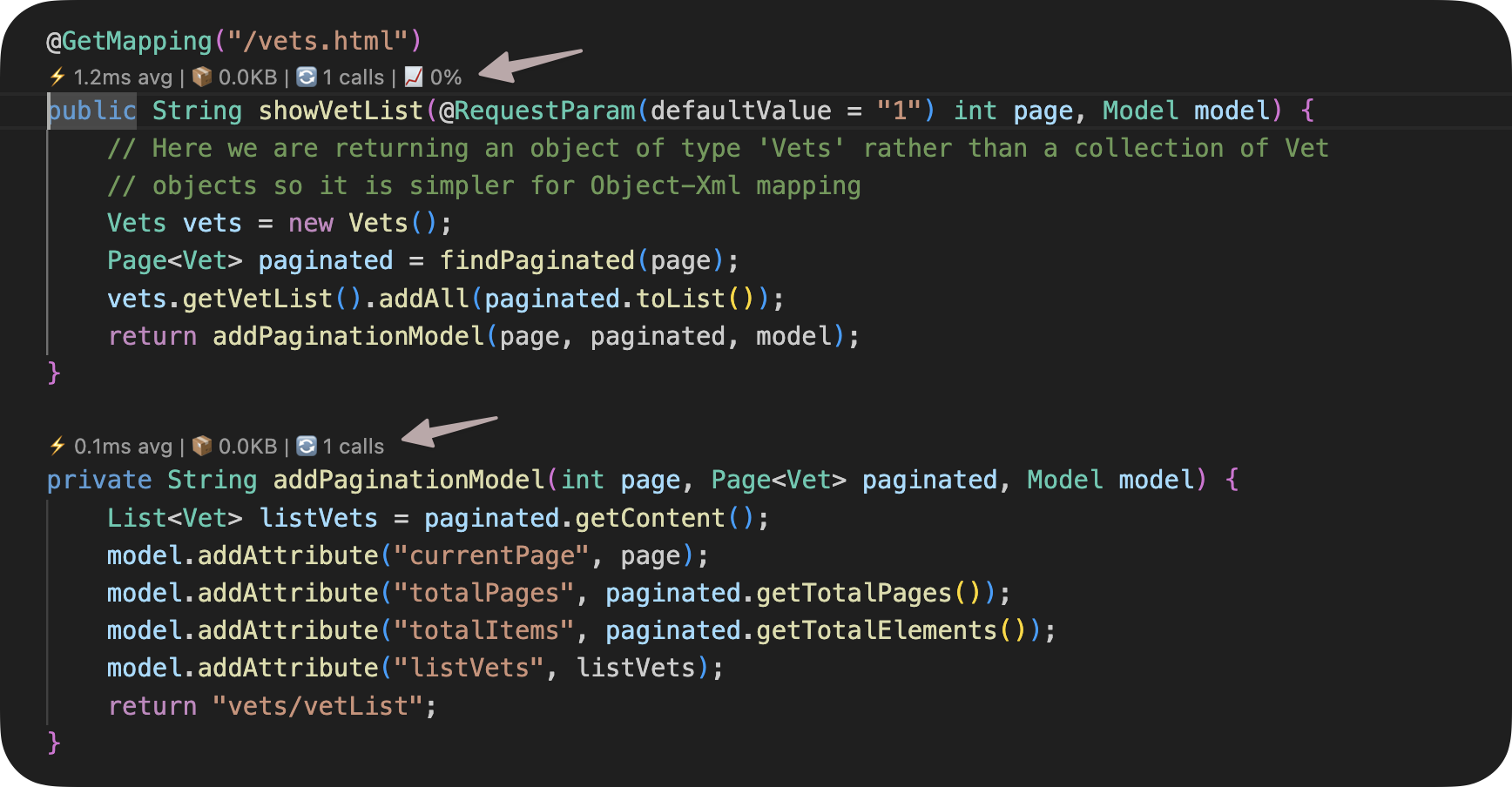
GalataJ shows method-level performance metrics inline in your code.
No dashboards. No context switching. Just profile and see.

image

IDE Screenshot

IntelliJ / VS Code with inline metrics

Why GalataJ ?

Performance Problems Are Hard to Find

Traditional tools leave you guessing. GalataJ shows you exactly where to look.

monitoring

APM Dashboards

You see graphs, but not which line of code is slow. Context switching kills productivity.

tune

Heavy Profilers

JProfiler and VisualVM require setup, separate windows, and constant context switching.

psychology_alt

Guessing

You optimize the wrong method because you don't have data. Hours wasted on hunches.

auto_awesome

AI

Your AI tools has no idea about your application's performance ❗️

Powerful Features

Everything you need to find performance bottlenecks without leaving your IDE.

Free
code

Inline Metrics

See execution time and call count directly above your methods in IntelliJ and VS Code.

Free
speed

Live Tab

Real-time profiling data in a dedicated panel. Watch metrics update as your app runs.

Free
category

Context Detection

Automatic detection of HTTP requests, database calls, and scheduled tasks.

Pro
compare

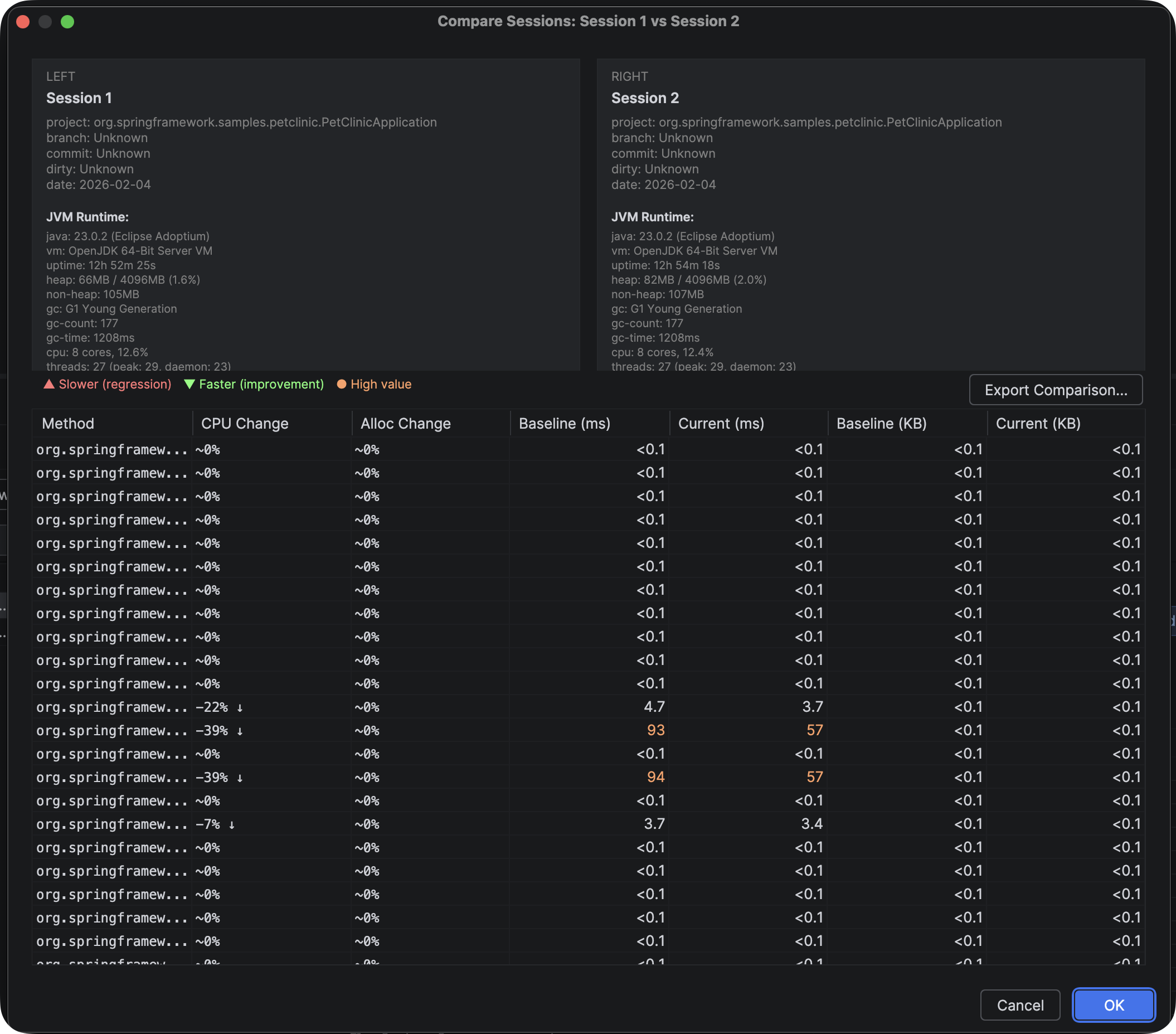
Session Compare

Compare profiling sessions to detect performance regressions before they hit production.

Pro
psychology

AI Context Files

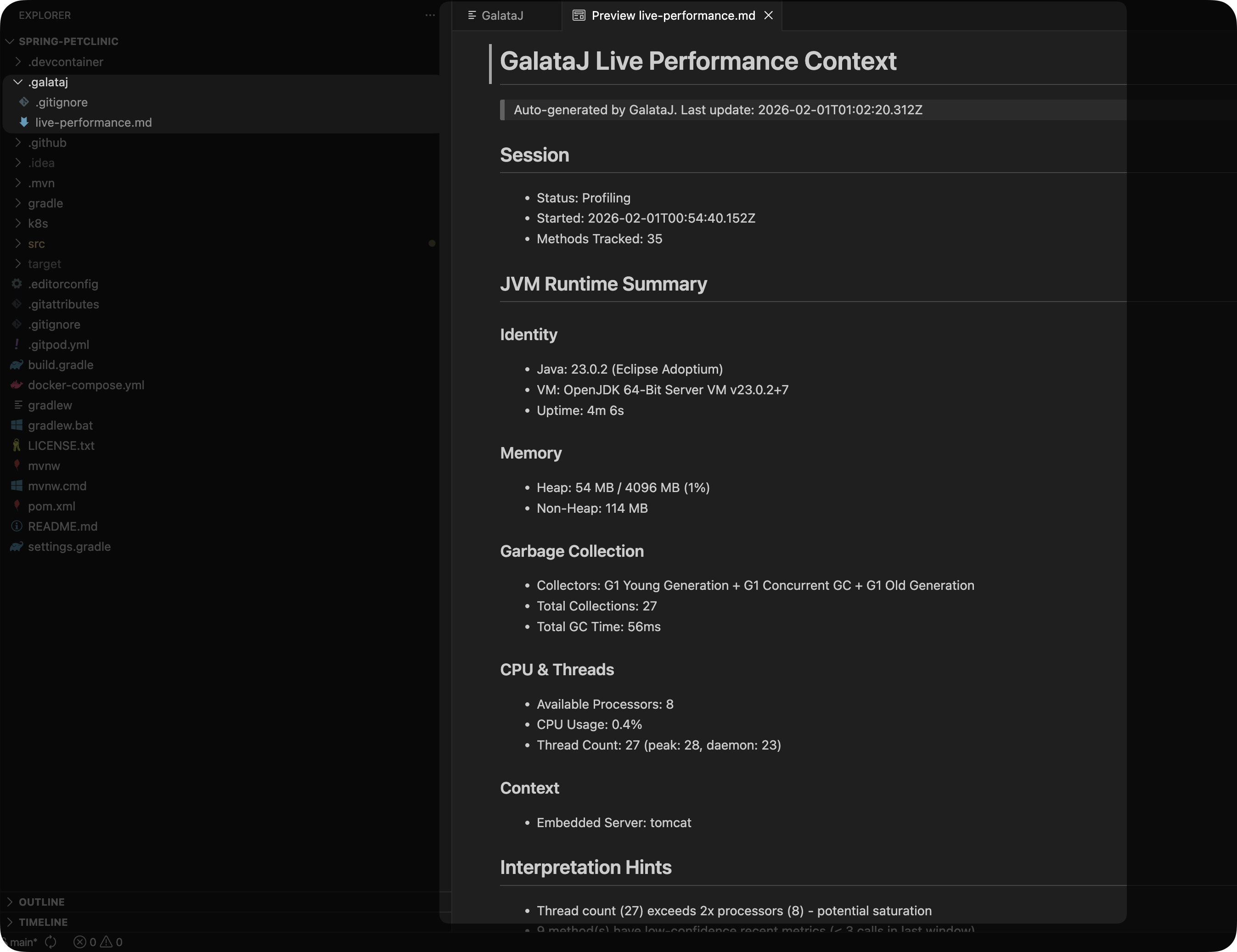
Generate live-performance.md and baseline-live-compare.md for AI-assisted optimization.

Pro
trending_up

Baseline Tracking

Track performance baselines and get automatic alerts when methods regress.

Feature Spotlight

Deep dive into the core functionalities that make GalataJ a must-have for Java development workflows.

auto_awesome

Inline Metrics

See execution time and call count directly above your methods in IntelliJ and VS Code.

  • check_circle Inline metrics in your code
  • check_circle Powerful "Add to Chat" button
Inline Metrics Demo
Real-time Diagnostics Demo
analytics

Live Tab

Real-time profiling data in a dedicated panel. Watch metrics update as your app runs.

  • check_circle Real-time metrics from your local JVM or Docker containers
rocket_launch

Session Compare

Compare profiling sessions to detect performance regressions before they hit production.

  • check_circle Save single or compared sessions to your local filesystem
  • check_circle Compare two sessions to detect performance regressions
  • check_circle Export single or compared sessions to JSON/CSV/HTML
Flame Graph Export Demo
AI Context Files Demo
description

AI Context Files

Generate live-performance.md and baseline-live-compare.md for AI-assisted optimization.

  • check_circle Generate live-performance.md and baseline-live-compare.md in your project's .galataj/ folder
  • check_circle Predefined prompts for ChatGPT, Cursor, and other AI assistants

HOW IT WORKS

01

Install Plugin

Install the plugin from marketplace, then install the core components with one click.

02

Start Profiling

Click "Start Profiling" in your IDE. No restart needed.

03

See Metrics

Metrics appear inline in your code as you browse.

GalataJ uses bytecode instrumentation to measure method execution time, memory allocation, and call frequency — with minimal overhead (~3%).

What GalataJ Doesn't Do

GalataJ is a developer profiler, not an APM or monitoring tool.
We help you find WHERE the problem is. Understanding WHY is your job.

close Not a replacement for Datadog, New Relic, or Dynatrace
close No automatic deadlock detection
close No SQL query content capture
close No distributed tracing
close No production monitoring alerts

Built for AI-Assisted Development

GalataJ doesn't guess. It gives your AI the context it needs.

description

live-performance.md

Real-time hotspots, trends, and context — updated as your app runs.

compare_arrows

baseline-live-compare.md

Automatic regression detection. See what got slower since your last baseline.

Example Prompts for your AI tools

Read .galataj/live-performance.md and .galataj/baseline-live-compare.md to get the context you need to improve your application's performance.

info AI suggestions are probabilistic, not conclusions. GalataJ provides structured context, not automatic answers.

Frequently Asked Questions

Common questions about functionality and compatibility.

Is it safe for production?

GalataJ is designed for development and testing environments, not production. It has approximately 3% overhead which is acceptable for dev/test but not recommended for live production systems. For production monitoring, use dedicated APM tools like Datadog or New Relic. GalataJ helps you find WHERE the problem is during development — APM tools help you monitor WHEN problems occur in production.

What Java versions are supported?

GalataJ requires Java JDK 11 or higher. It's fully compatible with JDK 11, 17, 21, and all later LTS versions. The agent uses bytecode instrumentation that works across all modern Java runtimes including OpenJDK, Oracle JDK, and Amazon Corretto.

Do I need to restart my application?

No restart required! GalataJ uses runtime attachment — you can attach the profiler to any running JVM process without stopping your application. Just click 'Start Profiling' in your IDE, select your Java process, and metrics start appearing immediately. This enables zero-downtime performance analysis.

Is it free? What's the difference between Free and Pro?

Yes, GalataJ has a generous Free tier! Free includes: inline metrics in your code, live profiling tab, context detection (HTTP, DB, Scheduler), and limited session saves. Pro unlocks: unlimited session saves, session comparison for regression detection, export to JSON/CSV/HTML, local Docker support, live context files for AI (.galataj/live-performance.md), and baseline tracking.

What is the performance overhead?

GalataJ has approximately 3% overhead. It uses efficient bytecode instrumentation to measure method execution time, memory allocation, and call frequency. The agent only instruments methods you're actively profiling, minimizing impact. This overhead is acceptable for development and testing but we don't recommend it for production workloads.

Can I use it without IntelliJ IDEA?

Yes! GalataJ supports both IntelliJ IDEA and VS Code with full feature parity. Both plugins provide inline CodeLens/CodeVision hints showing execution time and call count directly above your methods. Install from the respective marketplace, then install the core components with one click.

What operating systems are supported?

GalataJ supports Windows, Linux, and macOS. Pre-built binaries for the CLI, controller, and agent are available for all three platforms. The IDE plugins work on any OS where IntelliJ IDEA or VS Code runs.

Does it support Docker?

Yes! Local Docker support is available in the Pro tier. You can profile Java applications running in local Docker containers with automatic discovery. Note: Remote Docker and Kubernetes are not currently supported.

How does the AI integration work?

GalataJ generates structured markdown files in your project's .galataj/ folder: live-performance.md (real-time hotspots and trends) and baseline-live-compare.md (regression detection). You can use 'Add to Chat' in the IDE to copy this context directly to ChatGPT, Cursor, or any AI assistant. The AI then has the data it needs to suggest optimizations. Note: AI suggestions are probabilistic, not conclusions.

How does it differ from APM tools?

GalataJ is a developer profiler, not an APM. It shows you which methods need attention directly in your IDE during development. APM tools like Datadog, New Relic, and Dynatrace are for production monitoring, alerting, and distributed tracing. We're complementary: use GalataJ to find and fix performance issues during development, then deploy with confidence and monitor with APM.